Have you ever imagined a smart home that knows exactly which room you are in, tracks your movement, and even monitors your breathing while you sleep—all without a single camera lens or wearable device?
It sounds like science fiction, but it is 100% real. Thanks to an open-source Rust-based platform called RuView, this technology is now accessible to DIY enthusiasts using incredibly cheap hardware.
Here is a breakdown of how Wi-Fi Sensing works, what you need to build it, and the technical reality behind the magic.
The Science: How Can Wi-Fi “See” You?
Every time you move, sit, or even breathe inside a room, your body physically reflects and deflects the radio waves emitted by your home router.
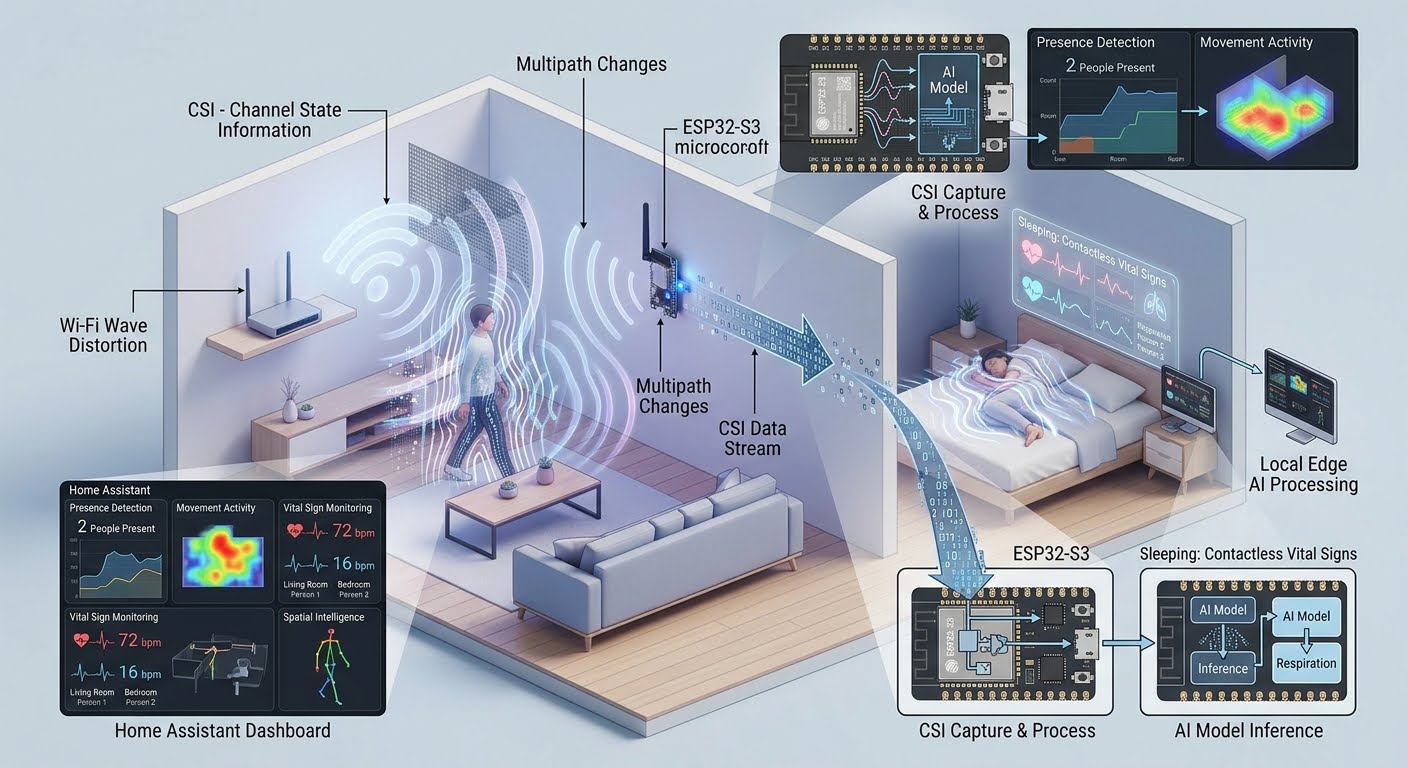
Modern Wi-Fi routers use a mechanism called Channel State Information (CSI) to map out how signals bounce off environments to maintain a stable internet connection. While routers normally discard this data once the connection is optimized, RuView taps into raw CSI data to read the microscopic distortions caused by human presence.
By analyzing these signal ripples locally using Edge AI models, RuView can achieve:
- Presence & Occupancy Detection: Sensing people through walls up to a 5-meter radius.
- Contactless Vital Sign Monitoring: Measuring heart rate and respiration cycles while you rest.
- Activity & Fall Detection: Identifying whether a person is walking, sitting, or has fallen over.
The Tech Setup: Can You Just Use a USB Wi-Fi Dongle?
A common question when discovering Wi-Fi sensing is whether standard PC hardware or a USB Wi-Fi dongle can be used. The short answer is no.
Standard USB Wi-Fi adapters abstract away low-level radio data, making raw CSI extraction impossible. Instead, RuView relies on dedicated, highly affordable microcontrollers: the ESP32-S3.
An ESP32-S3 development board costs between $5 to $10 (approx. Rp80.000 – Rp150.000) and features built-in hardware accelerators for AI vector instructions. This allows it to capture raw Wi-Fi packets and run machine learning inferences entirely on the edge.
How the Hardware Connects and Interacts
Understanding the physical and wireless layout of a RuView system is straightforward once you break it down into three simple components:
- The Physical Placement
The ESP32-S3 is a tiny, standalone board. Once flashed with the RuView firmware via a computer, it no longer needs to stay plugged into a PC. You can place it anywhere in the room—mounted on a wall or placed on a shelf—and power it using a standard USB phone charger.
- The Wireless Network Link
Your existing Wi-Fi Router acts as the Transmitter (Tx), while the ESP32-S3 acts as the Receiver (Rx). The ESP32 continuously listens to the Wi-Fi signal broadcasted by the router.
Because Wi-Fi waves scatter and bounce off walls, ceilings, and floors rather than traveling in a strict laser-like beam, they form a dynamic “Sensitivity Zone” covering the room. Anyone stepping into this zone alters the signal matrix, which the ESP32 registers instantly.
[ Wi-Fi Router (Tx) ] ~~~~ (Wi-Fi Waves / Room Reflections) ~~~~> [ ESP32-S3 (Rx) ]
^
Human Presence
(Distorts Sinyal Patterns)
- The Monitoring Dashboard
Once the ESP32 processes the distorted signal patterns into usable data, it streams the results over Wi-Fi to a local server. Most users integrate this with Home Assistant running on a Raspberry Pi or home server. From there, you can view real-time vital sign charts, track room occupancy, or trigger automated smart home routines (e.g., turning off lights when a room is truly empty).
Scaling to the Whole House
Because data tracking relies on the signal environment between a transmitter and a receiver, a single router paired with one ESP32 will only monitor that specific spatial intersection.
If you want to track an entire house, the principle is modular: you simply add more ESP32 nodes. By placing Node A in the bedroom and Node B in the kitchen, the central server can map your movement through the house as you transition from the field of one sensor node to another.
Wi-Fi sensing via RuView offers an incredibly private, camera-free approach to next-generation spatial computing—proving that the signals already bathing our homes can do much more than just stream video.