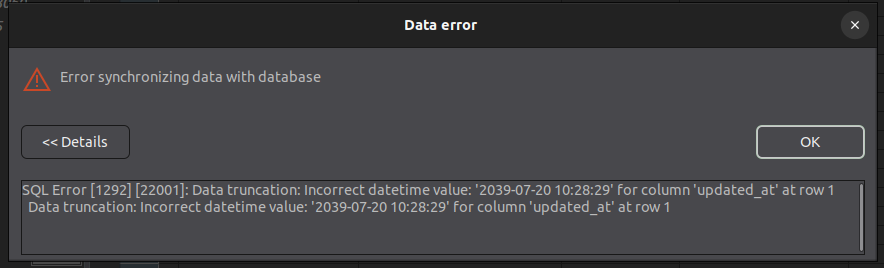
Why insert 2039-07-20 10:28:29 in timestamp data type cause error?
The Y2K38 error in MySQL occurs because the TIMESTAMP data type relies on a 32-bit signed integer to store Unix time (the number of seconds elapsed since January 1, 1970). This 32-bit counter will max out at 2,147,483,647 seconds, causing an integer overflow on January 19, 2038, at 03:14:07 UTC.
When you attempt to store a date past this threshold, MySQL triggers a value “out of bounds” or data truncation error.
How to Fix the Y2K38 Issue in MySQL
1. Migrate Columns to DATETIME
The most effective fix is to change your table schema to use DATETIME instead of TIMESTAMP.
- Why it works:
DATETIMEuses an 8-byte storage layout in modern MySQL versions and supports dates from'1000-01-01 00:00:00'all the way to'9999-12-31 23:59:59', bypassing the 2038 limitation entirely. - Migration Query:sql
ALTER TABLE your_table_name MODIFY your_column_name DATETIME;Gunakan kode dengan hati-hati. - Note: Unlike
TIMESTAMP,DATETIMEdoes not automatically convert values based on the server’s time zone settings. Your application logic will need to handle time zone offsets explicitly.
2. Upgrade Your MySQL Server
Ensure that your database engine is updated.
- Why it works: Upgrading to MySQL 8.0.28 or higher patches internal timestamp functions (such as
UNIX_TIMESTAMP()) to properly compute and handle date calculations extending past 2038. - Note: While upgrading fixes the functions, the underlying
TIMESTAMPcolumn type is still bounded by the 4-byte limit. Schema migration toDATETIMEis still required for the table columns.
3. Audit Built-In Functions
If you rely on time calculations directly within your queries, avoid legacy 32-bit functions or strictly validate their input boundaries. Passing a date past the 2038 cutoff to older iterations of functions like UNIX_TIMESTAMP() will wrap around or return
TIMESTAMP vs. DATETIME
| Feature | TIMESTAMP | DATETIME |
|---|---|---|
| Storage Size | 4 Bytes | 8 Bytes (in modern versions) |
| Maximum Date | 2038-01-19 | 9999-12-31 |
| Time Zone Aware | Yes (Converts to/from UTC) | No (Stores absolute value) |
| Y2K38 Safe? | ❌ No | Yes |
The Y2K38 error occurs in all versions of MySQL—including legacy versions like MySQL 5.7, current releases like MySQL 8.0, and Long-Term Support (LTS) releases like MySQL 8.4. There is no database version or configuration flag that can lift the 2038 limitation from the TIMESTAMP column data type.
The version-specific breakdown explains how different releases behave regarding this problem:
⚠️ Affected Versions & Behavior
- MySQL 5.7 and Older (End of Life)
- MySQL 8.0 (Up to 8.0.27)
- MySQL 8.0.28 and Higher
- MySQL 8.4 LTS and 9.x Innovation Releases
- Data Dictionary Bugs: Even in recent releases, severe internal issues persist. Setting your system clock past 2038 during or after installation breaks the underlying InnoDB Data Dictionary, rendering database creation or table alterations (
ALTER TABLE) entirely un-executable. [1]
- Data Dictionary Bugs: Even in recent releases, severe internal issues persist. Setting your system clock past 2038 during or after installation breaks the underlying InnoDB Data Dictionary, rendering database creation or table alterations (
Summary of Column Limitations
The underlying architecture of the column type itself dictates the date limit, irrespective of your server version: [1]
TIMESTAMPis limited to 2038-01-19 in every MySQL version.DATETIMEis safe until 9999-12-31 in every MySQL version.